IMVU does not currently have a dynamic lighting system, so as content creaters we have to be a little cleaver about how we suggest mood and lighting in the products we create. One of my favorite tricks is to add depth to the surface of my models with Vertex Shading. Although the tool itself is a little like trying to decorate a cake with a hammer, this trick has given me some nice results.
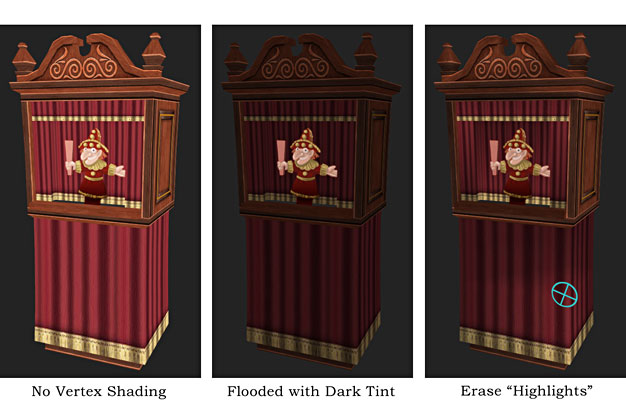 In 3D Max I select the mesh I wish to shade and flood the entire surface with a darker tint. I then take the eraser tool and just ever so lightly pick out areas that help define the object's surface, allowing other areas to remain dark, and in the “shadows”. This trick does a nice job of turning an otherwise flat model into one with a little more theatrics. Still, it is possible to get a little too dark, so I suggest you take a light hand when shading your own creations.
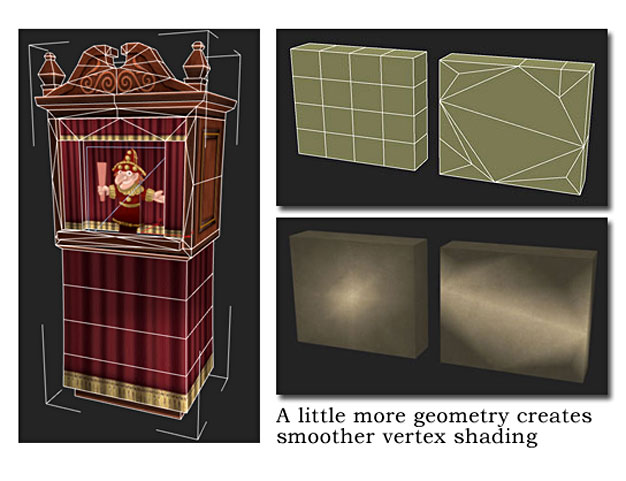 One other note. Vertex shading can get ugly fast if there is not enough geometry to help the transitions smoothly gradate across the surface of your model. To help alleviate this effect, I suggest you add just a little more geometry over large flat areas, and when in doubt use the blending tool to soften out any hard edges. It takes some time to get used to, but you will be happy at how much better your meshes look in the end. ~Don